Lead generation tools are software that find B2B prospects, run outreach and record what happened, and there is no shortage of them: the marketing technology landscape grew from roughly 150 solutions in 2011 to 8,000 in 2020, according to ChiefMartec's marketing technology landscape. The useful question isn't which tool is best. It's which stage of your pipeline is broken: data and list building, outreach and sequencing, or CRM and tracking.
This guide groups nine widely used tools by the stage they serve, then gives you a simple test, the Stage Bottleneck Test, to work out which stage to fix first and what each fix is worth. Every product here finds people, formats messages or records what happened. None of them decides who your buyer is or what your offer should say.
Table of Contents
- The three stages of lead generation tools
- 1. LinkedIn Sales Navigator
- 2. ZoomInfo
- 3. Apollo.io
- 4. Clay
- 5. Expandi
- 6. Dripify
- 7. Outreach
- 8. HubSpot CRM
- 9. Pipedrive
- Lead generation tools compared by stage and fit
- The Stage Bottleneck Test: which tool to buy first
- Lead generation tools FAQs
- Choose the stage, then the tool
The three stages of lead generation tools
Stage
What the tools do
Tools in this guide
Signal that this stage is your bottleneck
Data and list building
Find companies and contacts, enrich and filter records
LinkedIn Sales Navigator, ZoomInfo, Apollo.io, Clay
Low reply rate, high bounce rate, replies from people who can't buy
Outreach and sequencing
Send and schedule connection requests, emails and follow-ups
Expandi, Dripify, Outreach (Apollo.io also sequences)
Good list, but outreach is irregular or follow-ups get missed
CRM and tracking
Record conversations, stages, next steps and outcomes
HubSpot CRM, Pipedrive
Replies arrive but nobody knows which ones turned into deals
The market keeps growing, which is why diagnosis matters more than selection. The 2022 edition of the landscape counted 9,932 solutions, an estimated 24% more than in 2020 (MarTech's coverage of the 2022 landscape). A market that size will always have another product promising to fix your quarter.
1. LinkedIn Sales Navigator
Sales Navigator is LinkedIn's paid prospecting layer. It runs filtered searches on title, seniority, company size, industry, geography and recent company news, saves accounts and leads, flags job changes, and includes InMail credits. It's the first paid tool most B2B firms buy, because their buyers already spend the working day there.
The channel has a long track record for B2B. LinkedIn's own lead generation page cites a 2017 Wpromote report in which 89% of B2B marketers said they use LinkedIn for lead generation and 62% said it generates leads for them, more than twice the next-highest social channel (LinkedIn lead generation resources). The figures are dated, so treat them as evidence of long-standing use rather than a current benchmark.
The filters are not the strategy
The tool finds people. It doesn't decide who deserves a message. A three-person consultancy can build ten saved searches in an afternoon and still send nothing worth reading, because "finance directors at 50 to 500 employee companies in two regions" is a filter set, not a targeting decision. Writing that decision down first is what an ideal customer profile template is for.
Say a SaaS founder uses lead alerts to catch prospects who changed roles in the last month, then sends two lines about the first ninety days in a new job. That lands because the offer matches the moment. The same alert pointed at a generic pitch gets ignored, and ignored invitations pile up as account risk.
The comparison below is the difference between the two approaches at a glance.
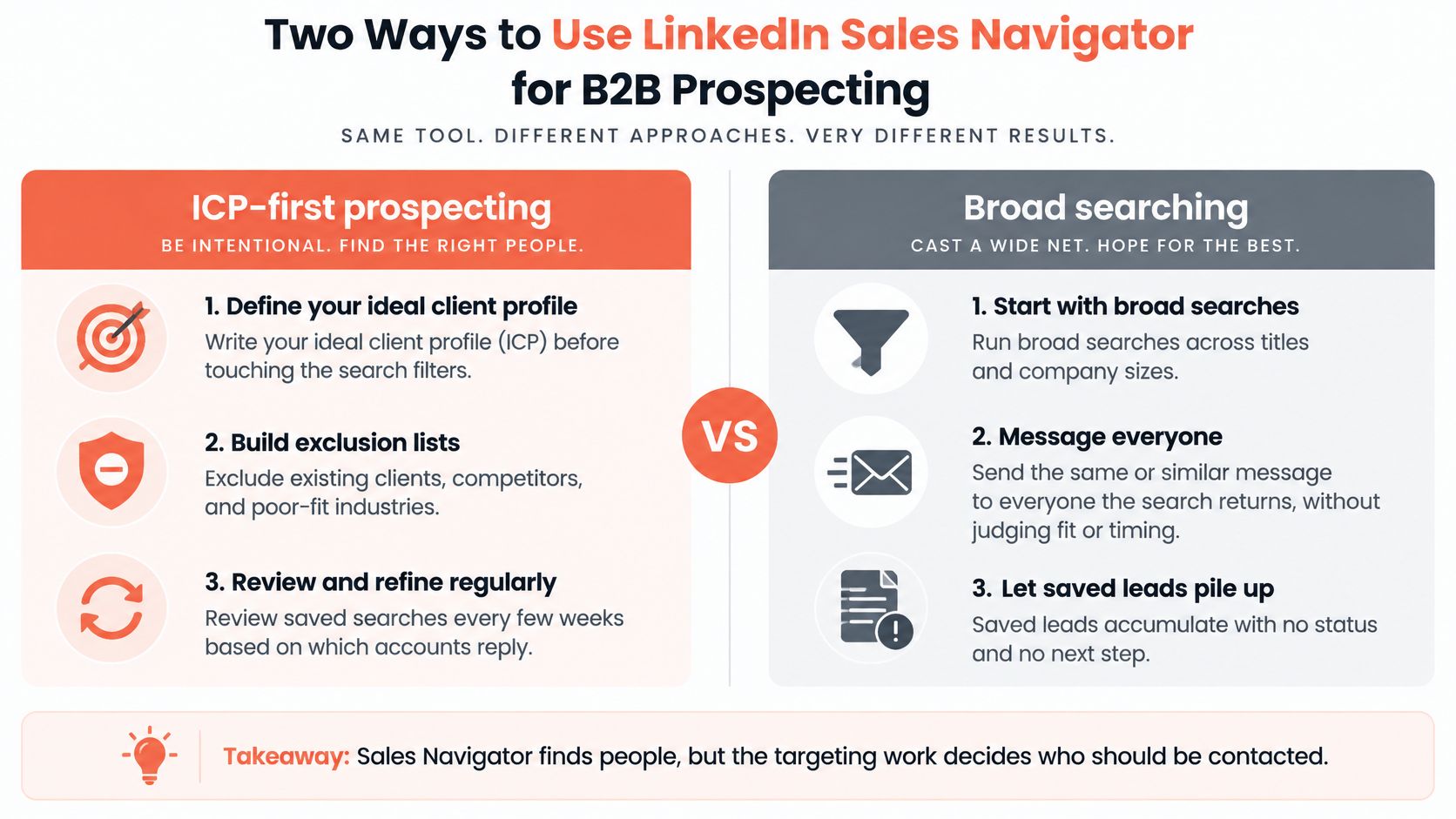
Write the profile first. Translate your ideal client into filters before you open the search bar. Build exclusions early. Current clients, competitors, suppliers and industries you can't serve well. Refresh searches every few weeks. Keep the ones where accounts reply, retire the rest. Watch your profile. Buyers check it before they answer, and our guide to the LinkedIn social selling index covers what those checks reward.
Turning a search into a usable list is the work many teams skip. That's what custom list building covers here: Boolean targeting, exclusion lists and revisions as campaign results come back.
2. ZoomInfo
ZoomInfo is a B2B contact and company database. Sales teams use it to find business emails, direct dials, firmographic detail and technographic signals such as the software a company runs, then push those records into a CRM. For a small firm its strongest use is enrichment, adding verified decision-maker contacts to accounts you've already chosen.
Enrich, don't discover
ZoomInfo is built for larger sales organizations, and the contracts reflect that. The decision should come down to one number: how many verified contacts your team will work each month. A 400-record list nobody calls is an expensive spreadsheet with a renewal date.
Say a small agency finishes list building with 300 target companies. It pulls two verified contacts per company, checks a sample against the company site and LinkedIn, drops anything that fails its fit criteria, and lands with roughly 500 records worth sequencing. That's a better use of the seat than exporting everything the database returns.
Technographic filters are where the product earns its keep. If your offer only makes sense for firms running a specific accounting platform, that one filter will cut a list more usefully than any job title will.
Where small teams lose money: paying for volume they never touch. Buy the tier that matches your monthly working capacity, not the one in the sales deck.
A research pass should look like this before you export anything.
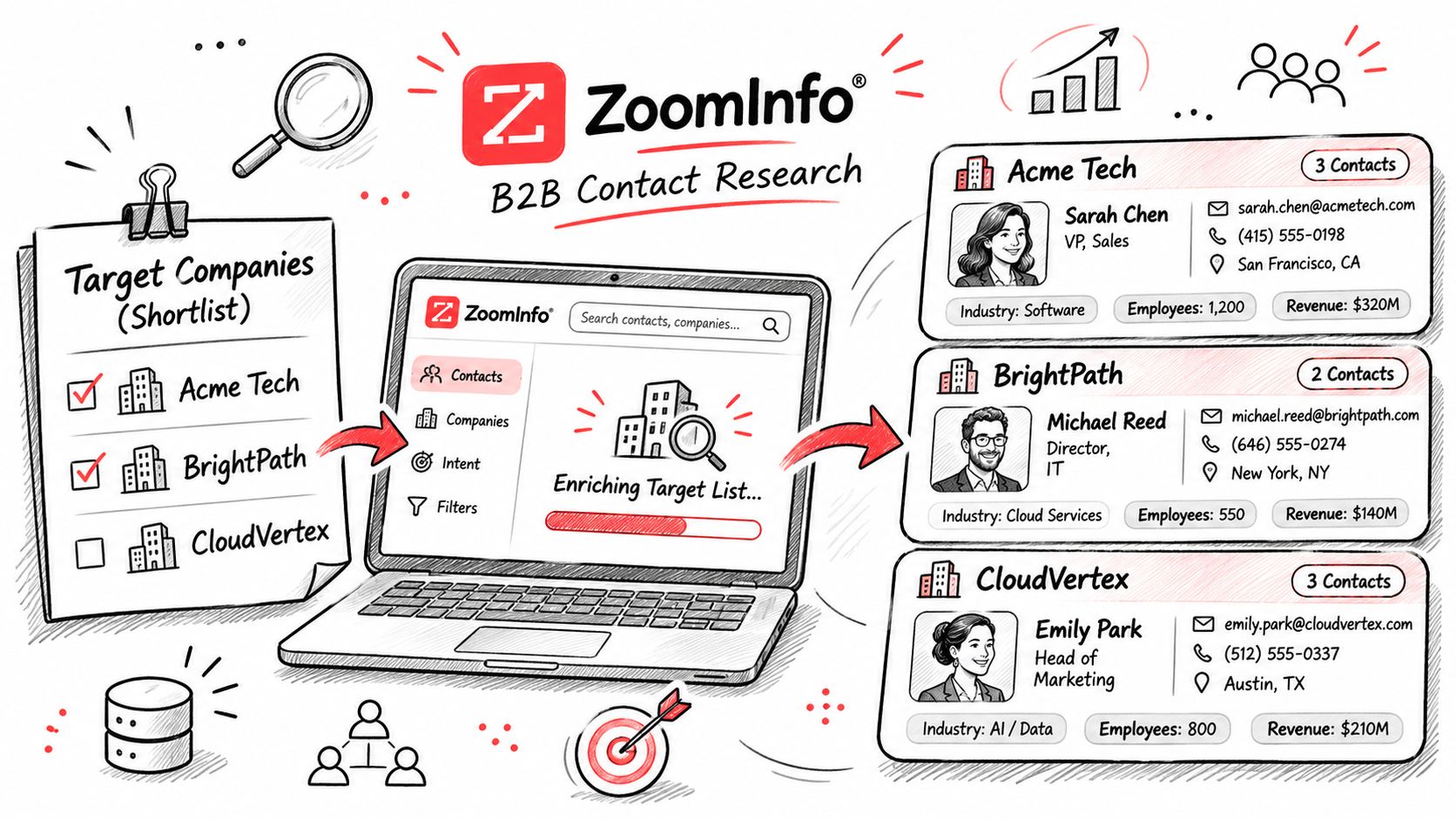
Test accuracy on a sample. Check 20 records by hand before you commit to a contract. Start with one narrow segment and measure reply rates before you buy more credits. Track which fields predict replies. Job title, tech stack or hiring signal, one of them will outperform the others.
3. Apollo.io
Apollo.io combines a B2B contact database with prospecting search, email and phone data credits and a built-in sequencing tool. Small teams like it because one login covers finding contacts, exporting them and running a multi-step outreach in the same place. The consolidation is real, and so is the temptation to skip research.
More sequences don't create interest that isn't there. A 2025 survey of 350 B2B buyers found that about a quarter now use generative AI more than traditional search for vendor research (buyer intelligence research from Responsive). Buyers are forming shortlists in places your sequence never reaches, which makes segment choice the decision that matters and send volume the one that doesn't.
Say a two-person SaaS company searches for operations managers at mid-sized logistics firms, exports 150 contacts, and runs a short sequence to the segment with the tightest fit. The founder tests the free plan on one niche first, watches bounce rates, and only pays for credits once a segment shows replies.
What to watch
- Bounce rate before volume. A weak list at 20 sends a day is cheaper to fix than at 200.
- Short sequences. Two or three steps written for a role beat a six-step generic drip.
- Find the step that earns the reply. Keep it, rewrite the rest.
- Export only qualified records. The database should feed your CRM, not become it.
If you're prospecting on LinkedIn alongside it, our walkthrough on how to find B2B prospects covers the search logic that keeps a list tight.
4. Clay
Clay is a spreadsheet-style enrichment platform. You start with a list of companies or people, then add columns that look up company news, job postings, technology stack, contact details or custom fields, and you can run AI prompts to write or categorize data. It earns its place when your targeting criteria don't fit standard database filters.
Say a marketing agency wants companies that posted a job for a demand generation manager in the past month. That's a buying signal no drop-down menu carries, and a column can find it, then check the company site for a relevant product page. A services firm can build a scoring column so the team only works accounts above a fit threshold.
Setup is the cost
Clay asks more of you than a point-and-click tool, and that's where adoption stalls. In the 2025 NFIB Technology Survey, 57% of the 521 small-business owners surveyed said they had introduced new or significantly improved technology in the previous two years. Among the smaller group already using AI, only 27% said they use or plan to use it for marketing or advertising. Buying a workflow tool and building a workflow are two different projects.
The workflow below is the kind of research build this tool supports.
Write the scoring rules down first. If the criteria live in your head, the columns drift. Test on 50 to 100 records before you scale the table. Review a sample by hand to catch misclassified companies and stale data. Keep a "why this account" column. It feeds lead qualification later and stops the team from guessing.
5. Expandi
Expandi is a LinkedIn automation tool that sends connection requests and follow-up messages on a schedule, with settings designed to keep activity within human-like limits. It suits teams that want multi-step LinkedIn sequences without manually sending each message. The main question isn't whether it works. It's whether you're comfortable carrying the account risk.
LinkedIn caps how many invitations a member can send, and a member who reaches that cap can be temporarily restricted from sending more (LinkedIn help on invitation limits). Automation turns a pacing problem into a daily one.
Say a founder runs a connection request, a short personalized note after acceptance, and one follow-up. At conservative volume with a specific observation in every message, that's a sound cadence. At the tool's maximum with a template, it reads exactly like what it is, and recipients respond accordingly.
The lower-risk route
If you'd rather not carry automation risk on your own profile, managed LinkedIn outreach sends human-written messages from your profile, paced like a person sending them.
A sequence is only as good as its first two lines.
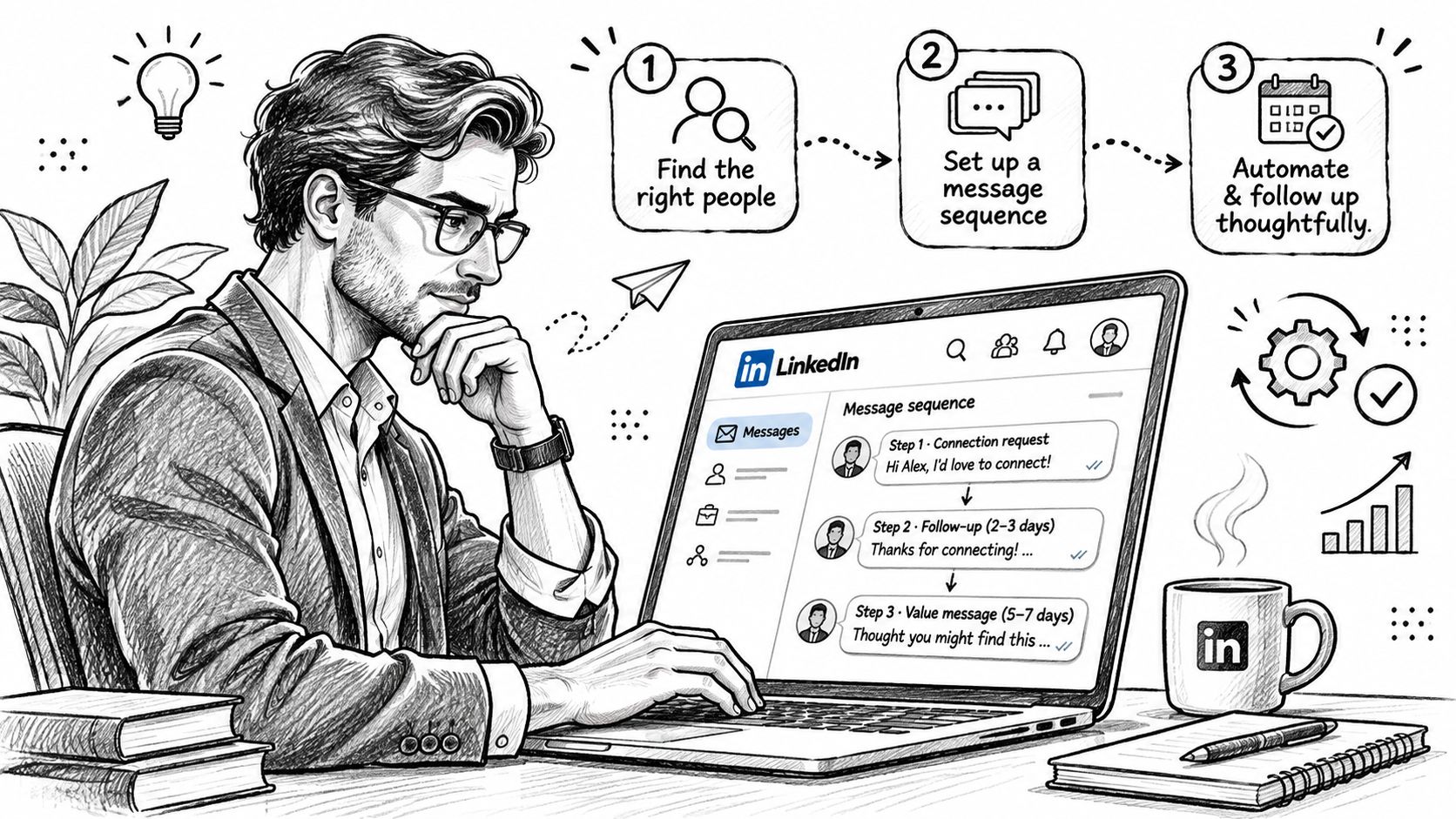
Our breakdown of the LinkedIn connection request message covers what makes a request worth accepting, and it applies whether a person or a tool presses send. Keep daily limits conservative, avoid sudden spikes after a quiet week, personalize every opener, and pause the campaign the moment the account shows a warning.
6. Dripify
Dripify is a LinkedIn automation tool built around a visual campaign builder. You set steps, delays and conditions across profile visits, connection requests, messages and follow-ups, so a message only fires after a connection is accepted. It's a cadence tool, not a source of prospects, and it carries the same account risk as any automation.
LinkedIn's own guidance is blunt about how that risk arrives. If too many recipients answer a connection request with "I Don't Know" the sender, the account may become restricted, and a restricted member can't send further requests without the recipient's email address (LinkedIn's guide to building a high-quality network).
That one paragraph should shape your campaign design. Volume is the least important variable in it. Targeting accuracy and a recognizable sender are what stop a recipient from reaching for the negative option.
A professional services firm might run a profile visit, wait two days, send the request, and send the personalized note only after acceptance. A SaaS sales lead tags replies by intent so a "not now" stops receiving pitches while an "ask me in Q3" moves into lead nurturing.
A follow-up after a clear "not interested" costs you more than the message it replaces. Build the branch that stops it before you build the one that sends.
Use conditional branches for accepts, declines and no-response. Limit volume and check for account warnings weekly. Write openers per segment, not one clever script for everyone. Review replies the same day and move qualified conversations into your CRM.
7. Outreach
Outreach is a sales engagement platform for running coordinated sequences across email, calls and tasks, with analytics on cadence performance and deep Salesforce integration. It's built for managing several reps at once and giving a manager a view of who is doing what. For a small business, it's usually more platform than the team can use.
Its value appears when process is the problem: five people prospecting five different ways, no shared view of which steps produce replies, no evidence to coach from. That's a management problem a platform can solve. It isn't a targeting problem, and buying it won't fix one.
Say a mid-sized consulting group with several business developers runs shared sequences and reviews weekly cadence reports to see which step earns replies. The sales manager then coaches call preparation using the same data instead of anecdotes. That's the point where a platform earns its fee.
Before you buy
Document the process first. If it lives in one person's head, the platform will standardize the wrong thing. Start with two or three shared sequences and refine them for a month before adding more. Agree on qualification criteria so reps don't log polite replies as opportunities. Check whether your CRM's built-in sequences already cover it. For teams under five people, they usually do. More on structuring that motion in our guide to outbound lead generation.
8. HubSpot CRM
HubSpot CRM is a customer relationship platform with a free starter tier: contact and company records, deal pipelines, activity logging, email tracking and tasks. Paid Sales Hub adds sequences, call logging and deeper reporting. For small B2B teams it's the usual place to store prospects, record conversations and see which deals are moving.
The CRM decides whether the rest worked
Every other tool on this list feeds the CRM, so the data discipline you set here determines whether the rest was worth buying. Define stages and entry criteria before you import a single list. If "qualified" means "replied", your pipeline will look healthy while your calendar stays empty.
A two-person consulting firm can run the free tier well: tag each prospect by segment, use custom deal stages to separate first replies, qualified conversations and proposals, and review the pipeline every Monday with the same questions.
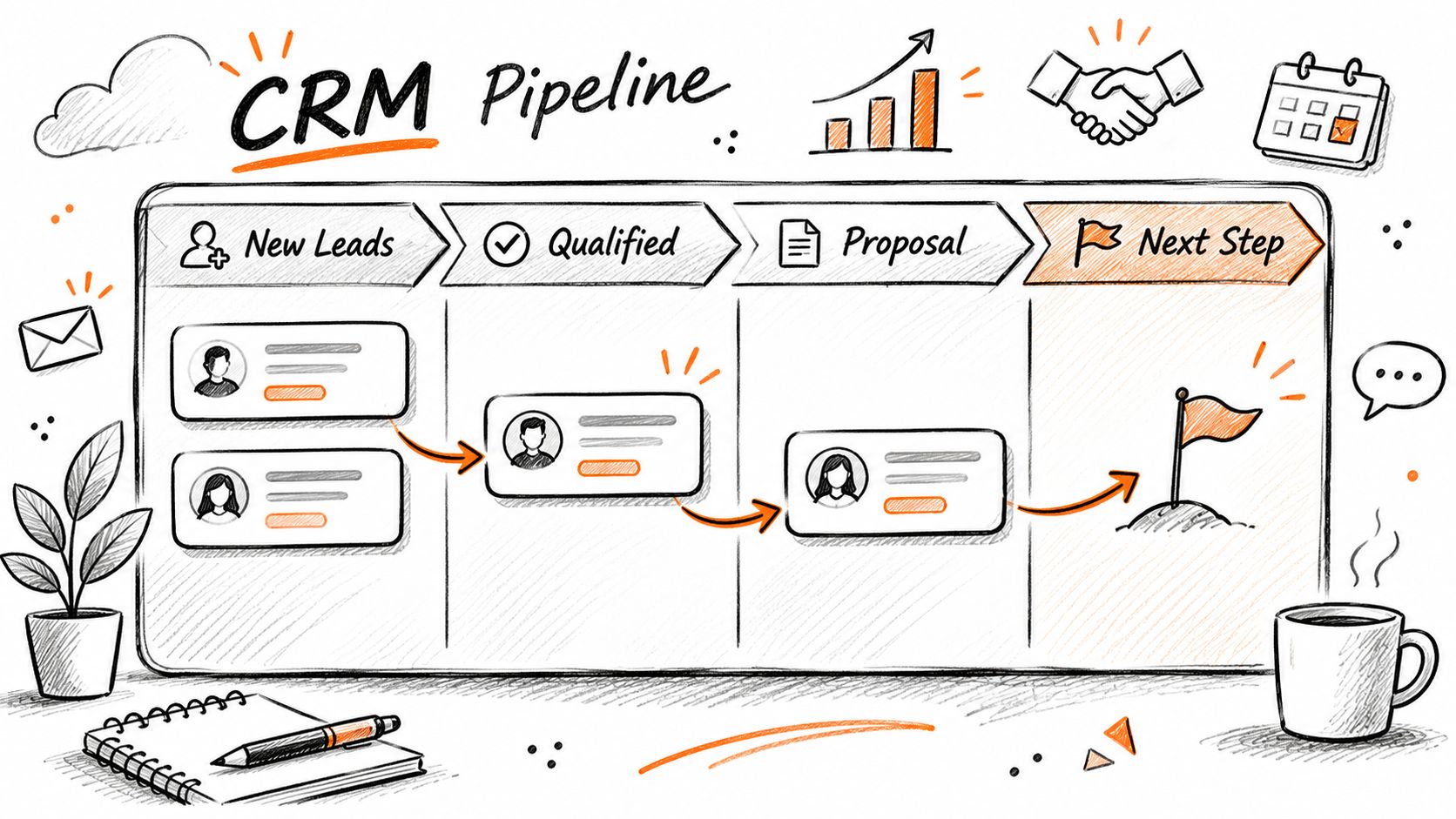
Require a reason for every lost deal so patterns surface in a month instead of a year. Use tasks for follow-ups so a qualified reply never goes unanswered. Review weekly with the metrics in our notes on business development KPIs.
9. Pipedrive
Pipedrive is a sales-focused CRM built around a visual deal pipeline, with activity reminders, email and calendar sync and a large app marketplace. Small sales teams pick it because setup is short and the daily view answers one question well: which deals need action today. Its value still depends on the discipline of the people using it.
The strength is follow-up mechanics. A founder who puts a dated next step on every qualified lead stops losing conversations to silence, which is the most common way a small pipeline leaks. Stage names should match how you sell: first reply, discovery call, proposal sent, decision, closed.
Say a consulting team runs four stages, reviews stalled deals every Friday, and gives every open deal a next step with a date attached. Nothing sits more than three days without a touch, and the owner can see on one screen which conversations are turning into proposals.
Make it a habit, not a database
Set a next step on every deal. No date, no deal. Name stages after buyer actions, not your hopes for the deal. Connect your prospecting tools so leads arrive with source and segment attached. Price the whole stack, not one seat. Compare your total monthly cost against a managed option by checking our pricing before you commit.
Lead generation tools compared by stage and fit
Tool
Stage
Best for
Team size fit
Main limitation
Pricing model
LinkedIn Sales Navigator
Data and list building
Finding and tracking LinkedIn prospects with detailed search filters
Small to larger B2B teams
Limited email and phone details; targeting quality depends on your criteria
Paid per user; costs increase with seats
ZoomInfo
Data and list building
Enriching target-company lists with contact and firmographic data
Sales teams needing substantial contact data
Annual contracts can be expensive; data accuracy varies
Typically annual contracts
Apollo.io
Data and list building
Finding contacts, enriching data, and running basic email sequences in one tool
Small teams
Data quality and credit limits can constrain outreach
Free plan with limited credits; paid options
Clay
Data and list building
Custom research and enrichment workflows using multiple data sources
Teams willing to build and refine workflows
Steeper learning curve; usage costs can be hard to predict
Usage and data-source dependent
Expandi
Outreach and sequencing
Automating LinkedIn connection requests and follow-ups
Teams comfortable managing automation risk
LinkedIn automation can risk account restrictions
Subscription; check the vendor's site
Dripify
Outreach and sequencing
Building conditional, multi-step LinkedIn campaigns
Teams seeking a visual campaign builder
LinkedIn automation risk; does not provide prospect qualification
Subscription; check the vendor's site
Outreach
Outreach and sequencing
Coordinating multichannel sales sequences and team performance
Larger sales teams with managers
Complex and costly for small teams
Enterprise-oriented; costs can be high
HubSpot CRM
CRM and tracking
Managing contacts, deals, activities, and pipeline
Very small to larger teams
Costs rise with contacts, seats, and advanced features
Free tier; paid Sales Hub options
Pipedrive
CRM and tracking
Managing deal pipelines and follow-up activities
Small sales teams
Advanced reporting may require add-ons or workarounds
Costs scale with users and features
The Stage Bottleneck Test: which tool to buy first
Most small teams buy software against a demo. The Stage Bottleneck Test buys it against your own numbers: take last month's funnel, improve one stage at a time to a realistic target, and see which single fix adds the most qualified conversations. That stage tells you which tool category, if any, to pay for.
All inputs below are examples. Replace them with a month of your own data.
Input
Example value
C: prospects contacted per month
300
R: reply rate
8%
P: share of replies that are positive
25%
Q: share of positive replies that pass qualification
50%
S: monthly spend on your tool stack (any currency)
400
Today: qualified conversations = C × R × P × Q = 300 × 0.08 × 0.25 × 0.50 = 3 per month. Cost per qualified conversation = S ÷ 3 = 400 ÷ 3 ≈ 133.
Now test one fix at a time, keeping everything else the same:
Fix (one at a time)
Stage and tool category
Calculation
Qualified conversations
Cost per conversation (S = 400)
Better list lifts R from 8% to 12%
Data and list building
300 × 0.12 × 0.25 × 0.50
4.5
≈ 89
Sequencing lifts C from 300 to 400
Outreach and sequencing
400 × 0.08 × 0.25 × 0.50
4
100
Clear stage rules lift Q from 50% to 60%
CRM and tracking
300 × 0.08 × 0.25 × 0.60
3.6
≈ 111
With these example numbers, the list is the bottleneck: a tighter list adds 1.5 conversations a month, more than the extra sends do, without touching account risk. If your own numbers show a low P instead (people reply but aren't interested), no tool fixes it. That's the offer and the message.
Two rules keep the test honest. Change one stage per month, so you know which change worked. And only add spend to S when the fix it pays for shows up in your CRM as qualified conversations, not as activity. If the fix you need is a tighter list rather than new software, that's the work list building services cover.
Lead generation tools FAQs
What are lead generation tools?
They're software that supports one part of the path from stranger to signed deal: finding companies and contacts, enriching and filtering that data, sequencing outreach, or recording and reporting what happened. They supply inputs. They don't supply judgement about which accounts fit your offer.
What are the best B2B lead generation tools?
There's no single best tool, only the best fit for the stage that's holding you back. For most small B2B teams that means one prospecting search (such as Sales Navigator or Apollo.io), one place to record conversations (such as HubSpot CRM or Pipedrive), and an outreach tool only once the list and message are proven.
Which lead gen software suits small teams?
Whatever matches your bottleneck and your working capacity. A three-person firm that can hold twenty real conversations a month doesn't need enterprise sequencing. A prospecting search, one enrichment source, and a CRM with clear stages will support a small team through its first year of consistent outbound.
Are there free lead generation tools?
Yes. HubSpot CRM has a free tier and Apollo.io has a free plan with limited credits, which is enough to test one segment before paying. Free tiers are best used to prove a segment replies, not to run your whole program.
Do prospecting tools replace outreach?
No. Tools send messages. They don't decide who to contact, what to say, or whether a reply is a real buyer. That last judgement is where most pipeline is won or lost, and it's why a smaller number of well-researched conversations beats a large volume of generic leads.
Is LinkedIn automation safe?
It carries account risk. LinkedIn limits invitations and can restrict accounts whose requests recipients don't recognize. If you automate, keep volume conservative, personalize every opener and pause at the first warning.
Can ChatGPT do lead generation?
It can help with the preparation: summarizing a company's public information, suggesting segments and drafting message variations. It can't verify that a contact is current, judge whether a reply is a real buyer, or own the follow-up, so a person still needs to check facts and qualify every conversation.
How many lead generation tools are enough?
One per stage, sometimes fewer. If your prospect list is weak, a better sequencer just reaches the wrong people faster. If your CRM stages are vague, more prospecting volume makes the reporting worse. Add software when the Stage Bottleneck Test shows a specific step holding you back, not when a trial expires.
Choose the stage, then the tool
Buy one tool per stage, and only for the stage that's broken. If replies are thin, the problem is targeting or messaging. If replies arrive and nothing closes, the problem is qualification and follow-up. Buy against the diagnosis, not the demo. If inbound forms are part of your mix, these form optimization tips from Polish cover the conversion side.
In practice, the limiting factor for most small teams isn't the software. It's the research and qualification work behind it, which can't be bought as a subscription. Outbound Consulting's managed LinkedIn lead generation service covers ICP-based list building, outreach from your own profile, reply qualification and nurturing, while your own team takes the sales calls; the company reports having worked with 2,000+ clients.
If list building and follow-up are the stages that keep slipping, visit Outbound Consulting to see how a managed system fits alongside the tools you already own.